Personal financial planning
Estimate your future balance after income, everyday expenses and major purchases. Tetri forecasts 2 years ahead. Use separate scenarios to compare options, such as renovating now or waiting 6 months.
Future spending in the context of your plan
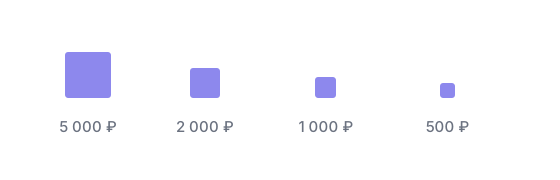
The cost of a major purchase
Compare monthly expenses and one-off purchases on the same scale. Each square represents an equal amount. At €100 per square, a €2,400 renovation takes 24 squares.
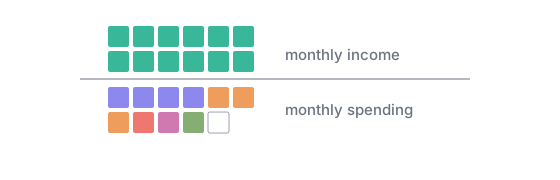
Your balance after payments
A positive year-end total does not cover every earlier bill. A large expense before payday may still require savings. Follow the net worth line to check which months have the lowest expected balance.
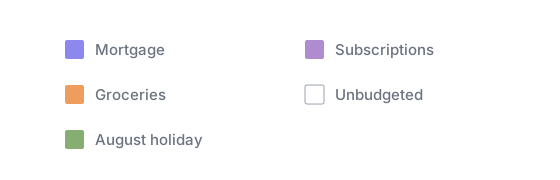
What your planned spending includes
The forecast includes budgets, recurring payments, goal contributions and unbudgeted expenses. Colours identify the source of each amount. Open a part of the plan to check it before changing the total.

History and forecast
Past months show recorded transactions; future months show expected amounts. With enough history, you can also review variation in income and expenses over the last 12 months. Future values remain estimates.
A financial plan based on your budget
Your existing budgets and recurring payments are included in the forecast. Set the rent amount and schedule once instead of entering it for every future month.
Planned goal contributions count toward future expenses too. Compare them with expected income to estimate what remains after everyday spending and saving.
Infrequent bills count in their payment month. Annual insurance, for example, reduces the November forecast balance even if car expenses are usually low.
Scenarios before a financial decision
Before switching to part-time work, try a plan with a lower salary. Check the balance after your existing expenses and goal contributions. Use another scenario for a month without income between jobs.
Comparisons leave the base plan unchanged. Keep up to 20 drafts and return to an option when you know the amount or date.
A copy of your current plan
A new scenario contains your existing budgets and payments. Add the cost of a purchase to test it without entering the whole plan again.
Changes from the relevant month
A salary reduction in October can apply only to future months. For a temporary income change, choose a limited period.
A comparison of balances
Compare final net worth and the lowest balance with your base plan. You can assess both the long-term cost and a potential shortfall in a particular month.
Your chosen option
Review the changes before applying a scenario. Other drafts have no effect on the base plan.
Applying and undoing changes
Before applying a scenario, compare previous and new amounts and dates. Check each change, such as postponing a holiday or increasing a renovation budget, then confirm the option.
You can roll back to the previous plan after applying it. There is no need to restore each amount manually.
The full budget for a renovation or move
A renovation includes a deposit, materials and furniture. Group these payments into one decision to review the full cost, including expenses you have already paid. Individual payments keep their own dates and categories.
Compare actual and planned amounts before placing the next order. Deleting the decision keeps its transactions in your records.
Planning major purchases
Try a €2,400 purchase in June and again in November. The price is the same, but other payments in those months change the remaining balance. Compare the scenarios before choosing when to buy.
One payment or several instalments
Add a laptop as one expense. For a renovation, schedule the deposit and final payment in different months and group them under the total cost of a decision.
Income and expenses in different currencies
A dollar salary and rent in euros need a common forecast currency. Review the total balance in that currency while each payment keeps its original amount.
Next year’s expenses
Include the next holiday and annual insurance in your 2-year plan. Examine the nearest months in more detail when choosing a payment date.
Planning on iPhone
Check monthly balances and compare scenarios on your phone. Applying an option and rolling it back are available on both iPhone and the web.
Financial planning questions
A budget limits one group of expenses, such as €300 a month for groceries. The financial plan combines that limit with your income and other payments to estimate your future balance.
Yes. Enter expected payments and test lower income in a scenario. The last 12 months of history give an estimate of previous variation, not a guarantee of future earnings.
Start with expected income and payments. Transaction history is optional; without it, the forecast has no estimate of past variation.
Up to 2 years ahead. Review the full period or focus on a few months.
The forecast marks the future month with the lowest balance. If it becomes negative, the first month below zero is also marked. The estimate depends on the income and expenses in your plan.
Forecasts, scenarios, decisions and goals are part of Pro. See the subscription terms for current prices and trial details. Free includes 3 budgets and 3 recurring rules.