Personal cash flow forecast template for Excel and Google Sheets
What is in the file
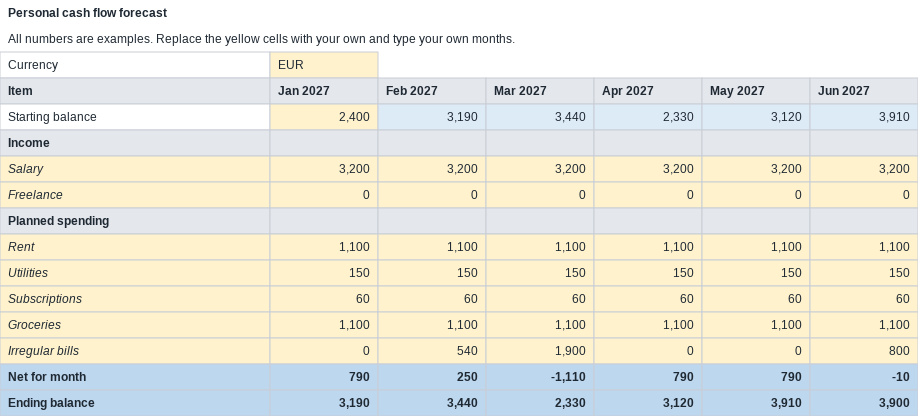
Forecast Six month columns: starting balance, income, planned spending, net for the month and ending balance. The lowest balance and its month are at the bottom. How to use Short steps for filling in the forecast, on its own sheet.
How to open the file in Google Sheets and Excel
- Open Google Sheets and create a blank spreadsheet.
- Choose File → Import and upload the XLSX file you downloaded.
- Choose Replace spreadsheet and click Import. This brings over every sheet of the file and the formulas between them.
- Open the sheets and compare the totals with the example below. If the numbers match, the formulas worked.
You do not need a shared Google file: you work in your own copy. In Excel and other spreadsheet programs, double-click the file to open it. It has no macros.
Steps from the Google help page “Import data sets & spreadsheets”, checked 2026-11-24.
How to fill it in
- Type your current balance in B5 and the currency of every number in B3. The sheet does not convert between currencies.
- Replace the example months in row 4 with your own, then replace the yellow example numbers in rows 7 to 14.
- Put each irregular bill in the month it falls due, in row 14.
- Later months start from the previous ending balance by formula.
- Compare the lowest balance in B18 with the minimum you want to keep. A negative ending balance turns red.
A worked example
The file has an example with made-up numbers and a starting balance of 2,400 EUR. Totals of the Forecast sheet:
- End of January: 3,190 EUR
- End of February: 3,440 EUR
- End of March: 2,330 EUR
- Lowest balance: 2,330 EUR
Irregular bills pull the balance down in the month they fall due. Compare the lowest balance with the minimum you want to keep.
How to move the data to Tetri
Load your bank statements for the same period into Tetri: the wallet import takes CSV, XLSX, PDF, OFX, QFX, STA and MT940 files. Banks and formats are listed on the “Bank statements and app exports” page. You cannot load this template as a statement: the import finds transactions only in bank statements. Enter the records from the spreadsheet in the app by hand.
Questions
Keep your finances in Tetri
Wallets in any currency, transactions from bank statements, budgets, goals and a balance forecast in one app.